Short answer
The standard SIM vs micro SIM vs nano SIM question has a short answer. Nearly every phone sold since 2015 takes a nano SIM, 12.3 by 8.8 mm.
Standard is 25 by 15 mm and micro is 15 by 12 mm. The chip inside is the same on all three, so size changes nothing about signal, speed or storage. It only decides whether the card fits in your phone.
That is the whole answer for most readers. The rest of this post is for the cases where the short answer is not enough: an older phone, a card bought in the wrong size, or a drawer full of old SIMs from phones you no longer own. It covers the three sizes side by side, the names that trip people up, which phones take which size, and the one map that matters most, which way adapters work and which way they never do.
Our two-way comparison of the smallest sizes is in the Day-1 guide: Nano vs Micro SIM: Which One Fits Your Phone?. If you already own the phone and want to check its size, the Day-2 lookup flow finds it in a minute. And if the phone is in your hand at the counter right now, the Day-3 check settles it in ten seconds: Wrong SIM Size? The 10-Second Check Before You Buy.
Standard SIM vs micro SIM vs nano SIM: the table
Three sizes are still in use. A fourth, the full-size SIM, is listed here because it explains where the others came from, but no phone takes it now.
| SIM size | Also called | Dimensions | Thickness | Face area | Introduced | First phone |
|---|---|---|---|---|---|---|
| Full-size | Credit-card SIM, 1FF | 85.6 x 54 mm | 0.76 mm | 4,622.4 mm squared | 1991 | Early GSM phones |
| Standard | Mini SIM, 2FF | 25 x 15 mm | 0.76 mm | 375 mm squared | 1996 | Feature phones |
| Micro | Mini-UICC, 3FF | 15 x 12 mm | 0.76 mm | 180 mm squared | 2003 | iPhone 4 |
| Nano | 4FF | 12.3 x 8.8 mm | 0.67 mm | 108.2 mm squared | 2012 | iPhone 5 |
The dimensions come from ETSI TS 102 221, the specification behind the SIM sizes, as cited by all four guides opened for this post. The years and first phones come from US Mobile and Smarty, which agree on every row. The face areas are arithmetic from the dimensions in the table: 25 times 15 is 375, 15 times 12 is 180, and 12.3 times 8.8 is 108.2.
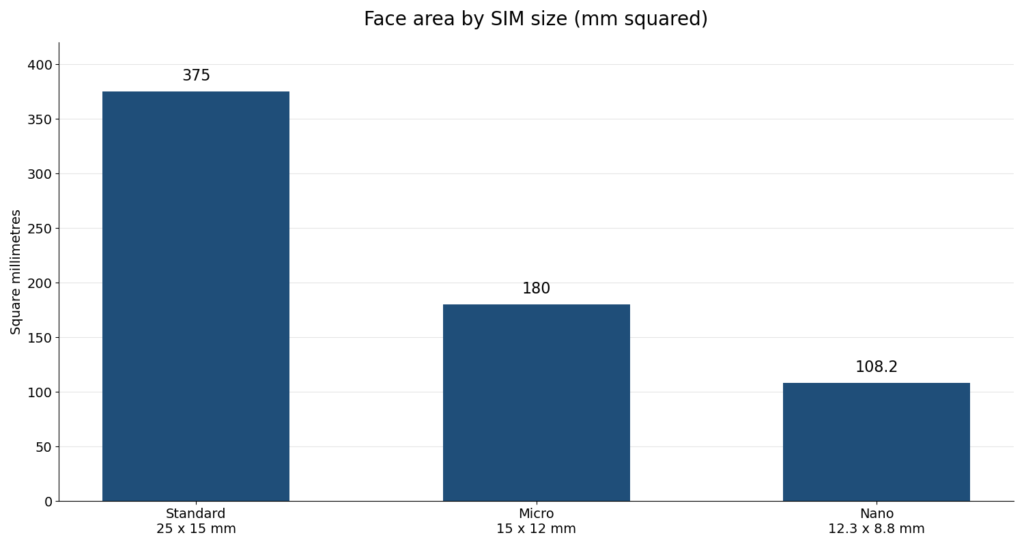
The chart makes the gap visible. A standard SIM covers about three and a half times the face area of a nano SIM. A nano SIM covers about 40 percent less face area than a micro SIM, which matches what ETSI said when it approved the nano size on 1 June 2012: 40 percent smaller than the smallest SIM then in use. That number is from CheapSimCard, citing the ETSI approval.
Two details in the table deserve a second look. First, thickness. Standard and micro cards are 0.76 mm thick. Nano cards are 0.67 mm thick.
The difference is 0.09 mm, small enough to miss on a ruler and large enough to matter in a tray, which is why cutting gets its own section below.
Second, the chip. Every guide opened for this post says the same thing: the gold contacts and the chip behind them are identical on all three sizes. Only the plastic around the chip changes. That is why adapters work at all, and why cutting is a gamble rather than a plan.
The names are a trap
The names cause more wrong purchases than the sizes do. What shops call a mini SIM is the standard size, 25 by 15 mm. What ETSI calls a mini-UICC is the micro, 15 by 12 mm. CheapSimCard puts it plainly: if someone offers you a mini SIM, they almost certainly mean the big one.
The full-size SIM is worth one paragraph because it explains the naming. The first SIM, from 1991, was the size of a credit card, 85.6 by 54 mm. US Mobile dates it to 1991 and names the maker, Giesecke and Devrient of Munich, which sold the first 300 to a Finnish operator.
The standard SIM that followed in 1996 was the plug-in piece punched out of that credit-card frame. Micro followed in 2003 and nano in 2012, each one trimming more plastic from around the same chip.
The names count down as the cards shrink: 1FF, 2FF, 3FF, 4FF. If a listing says 2FF, it means standard. If it says 3FF, it means micro. If it says 4FF, it means nano.
When you order, use the millimetres, not the name. A listing that says “mini” and a listing that says “micro” can both be wrong in the same shop on the same day. A listing that says 12.3 by 8.8 mm can only mean nano.
Which size does your phone take
Age answers it for most phones. A phone from about 2015 onwards almost certainly uses a nano SIM. Smarty gives that as its rule of thumb, and ShopCellPlans says the same: nearly every phone since 2014 takes a nano SIM. The exceptions are old phones, a few tablets and hotspots, and new phones sold in the US that have no tray at all.
The model table below covers the phones readers ask about most. The iPhone rows come from Apple’s own support page, published 5 November 2026, cross-checked against Smarty and US Mobile. The Samsung rows come from Smarty and US Mobile, which agree. The Pixel row comes from CheapSimCard, citing Google.
| Phone | SIM size |
|---|---|
| iPhone 3GS and earlier | Standard |
| iPhone 4 and 4s | Micro |
| iPhone 5 through iPhone 13 | Nano |
| iPhone 14 and later, bought in the US | No tray, eSIM only |
| iPhone 14 and later, bought outside the US | Nano |
| Samsung Galaxy S3, Galaxy S5 | Micro |
| Samsung Galaxy S6 and later | Nano |
| Google Pixel, all models except US Pixel 10 | Nano |
| Google Pixel 10 bought in the US | No tray, eSIM only |

Two rows need a note. First, the iPhone 14 split. Apple lists iPhone 14, 15 and 16 models bought in the United States as eSIM only, with no SIM tray, and the same models bought outside the United States as nano SIM plus eSIM. Where you bought the phone decides whether it has a tray, not the model name alone.
CheapSimCard adds that a US Pixel 10, 10 Pro or 10 Pro XL cannot use a physical SIM either.
Second, the Galaxy rows are not exhaustive. Samsung sells single, dual and hybrid trays across its range, and CheapSimCard warns that tray and SIM size vary by model. If your Galaxy is not in the table, check the specifications page for your exact model, or measure the tray. The tray-measure test is in the Day-3 guide linked at the top, and it takes about ten seconds.
Adapters only work one way
An adapter is a plastic frame with a hole shaped for a smaller card. The small card drops in, and the frame makes up the difference so the card sits correctly in a bigger slot. That is the whole mechanism, and it sets a hard limit: adapters only make a card bigger. They never make a card smaller.
Six directions cover every combination. Three work with an adapter. Three never do.
| Your card | Your tray | What works |
|---|---|---|
| Nano | Micro | Nano to micro adapter |
| Nano | Standard | Nano to standard adapter |
| Micro | Standard | Micro to standard adapter |
| Micro | Nano | No adapter. Cut the card or get a replacement. |
| Standard | Nano | No adapter. Cut the card or get a replacement. |
| Standard | Micro | No adapter. Cut the card or get a replacement. |
No page-1 guide lays out all six directions together. Smarty covers the small-to-big cases and warns that a loose adapter can jam. CheapSimCard covers the same ground and adds the warning that matters most: going the other way, from big to small, is not an adapter job at all. ShopCellPlans agrees, and says a correctly sized card from your carrier is safer than any adapter because adapters can catch inside the tray.
Treat an adapter as a stopgap, not a permanent fix. Smarty says a snug adapter works well and a loose one can jam in the slot. CheapSimCard says the same: a card that slides out of its adapter inside the phone is a far worse afternoon than visiting a shop.
If the adapter wobbles in the tray before you push it in, do not push it in. Ask your carrier for a card in the right size instead.
Cutting a SIM down: the two tests
Cutting goes the other way from adapters. It takes a card that is too big and trims it to fit a smaller tray. It can work, and every guide opened for this post says not to do it unless you have no better option. Two tests decide whether a cut is even worth attempting, and both must pass.
The first test is the chip test. Look at the gold contacts on the card. If the cut line you would need crosses any gold, stop. Cutting through the contacts kills the card.
US Mobile says nicking the gold chip ruins the card for good, and a single stray millimetre can leave it not fitting at all. A SIM cutter, the small press tool sold for this job, is safer than scissors because it cuts in the right place, but it does not change the chip test. If the line crosses gold, no tool saves the card.
The second test is the thickness test, and it is the one most guides skip. A micro SIM is 0.76 mm thick. A nano SIM is 0.67 mm thick.
Cutting trims the edges, not the thickness, so a cut micro SIM stays 0.76 mm thick while the nano tray expects 0.67 mm. The card can jam in the tray, and a jammed card can damage the tray when you pull it out. Day 1 flagged this same gap for nano vs micro; it applies to every cut, including standard to nano.
Apple’s warning is the one to take seriously. Its support page says damage to the SIM tray or device caused by a modified SIM card is not covered by the Apple hardware warranty, and that cutting or modifying a SIM to fit a different device might prevent connection to cellular networks. CheapSimCard adds a second warning from Google: some older SIM cards are not supported on Pixel 8 and later phones, which show a message saying the SIM is no longer supported and send you back to the carrier anyway. A cut card can fail twice over: too thick for the tray, and too old for the phone.
Bought the wrong size? Do it in this order
A wrong-size card is a small problem with a fixed order of fixes. Work through them in this order and stop at the first one that works.
First, check whether the card is triple-cut. Most cards shipped today are. ShopCellPlans says carriers now ship a single card with all three sizes pre-cut, so you push out the one your phone needs.
CheapSimCard describes the same packaging: a full-size carrier card with the SIM in nested cut-outs. Snap carefully, and snap only the size you need. Once the nano is out, the micro frame around it is gone too.
Second, if the card is too small for the tray, use an adapter. Nano into a micro or standard tray, or micro into a standard tray, all work with the right frame. Check the fit before you push the tray in. If the adapter is loose, stop and go to the next step.
Third, ask your carrier for a replacement in the right size. Smarty says networks can send a replacement and many will send a multi-size SIM that fits any slot. ShopCellPlans says carriers replace cards for free or a few dollars.
Apple says the same thing in different words: if your old SIM will not fit a new iPhone, contact your carrier to move your account to the SIM that came with the phone, or ask how to get a new one. A replacement costs a day by post or a few minutes in a shop. A jammed adapter or a cut chip costs more.
Fourth, and only if the first three are impossible, cut the card, and only if both tests above pass: the cut line misses all gold, and you accept the thickness risk. Do not cut a card you cannot afford to lose. If the number on it is your only number, get the replacement first and cut nothing.
Where eSIM fits
An eSIM is the size that is not one. It is a chip about 6 by 5 mm soldered inside the phone, and you download a carrier profile instead of pushing in a card. US Mobile gives the chip size, and CheapSimCard notes that ETSI’s specification already allows for it as a non-removable module. The size question disappears entirely, which is the point.
It does not disappear for every phone. US iPhone 14 and later models have no tray, and neither do US Pixel 10 models. Many other recent phones still have a nano tray alongside eSIM, so size can still matter even on a phone that supports eSIM. Smarty makes that point plainly: not every phone supports eSIM, and many that do still have a physical slot as well.
One convenience is real. Apple says iPhone 13 models and later support Dual eSIM, so two lines can stay active without any card at all. That is the direction the industry is moving, but it does not help the phone in your hand today if that phone has a tray.
If your phone has no tray and you are buying a travel SIM, the physical sizes in this post do not apply to you at all. Buy an eSIM plan for that phone instead, and check the phone supports eSIM before you pay.
Sources and check date
Checked 20 November 2026. The face-area figures are the draft’s own arithmetic from the dimensions in the table: 25 by 15 is 375, 15 by 12 is 180, 12.3 by 8.8 is 108.2, and 85.6 by 54 is 4,622.4 square millimetres. The adapter directions and the wrong-size rescue order are the draft’s own reading of the sources, not a figure from any of them. If a model in this guide has been replaced by a newer release since this check, the maker’s spec page for that model is the final word.
Sources
- ETSI TS 102 221 (PDF), the SIM specification behind the four sizes
- US Mobile, SIM Card Sizes: Nano, Micro and Mini Dimensions (updated 19 June 2026)
- Smarty, SIM card sizes: which one does your phone need? (published 13 October 2026, updated 18 November 2026)
- CheapSimCard, Nano SIM Card and Other SIM Card Sizes, Plus Adapters
- ShopCellPlans, SIM Card Sizes (2026): Nano, Micro and Standard Explained (published 4 October 2026)
- Apple Support, Learn which size SIM card your iPhone or iPad uses (published 5 November 2026)