Short answer
So what does SIM stand for? SIM stands for Subscriber Identity Module. Three ordinary words name the small card in your phone, and each word does a job. Subscriber names the person the network bills. Identity names the number the network checks. Module names the removable smart card that carries both.
Once you see the three jobs, the name stops sounding like jargon and starts reading like a label. This post takes the name apart word by word, then follows it back to the first cards of 1991 and forward to the eSIM and iSIM of today.
If you want the short version of what the card does, our guide to what a SIM card is covers the card itself, what lives on the chip, and what lives on the phone or in the cloud instead. If you want the proof step, our guide to how a SIM card works walks through the secret key check in plain words. This post stays with the name: what each word means, where it came from, and what you can read from your own card.
Subscriber: the person, not the phone
A mobile network sells a subscription, and the subscriber is the person who holds it. The first word of SIM says who the card belongs to: the account, not the handset. That distinction is the whole point of the card. Before SIM cards, the identity of a mobile line lived inside the phone itself on the networks that used that design, so changing phones meant changing the line.
The SIM moved the identity onto a card you can carry from one handset to another. The phone became a shell. The line stayed with the card.
Move the card and the service follows. Put your SIM in a borrowed phone and your number rings there. Put it in a new phone and the new phone works with your account, your number, and your plan. The carrier checks the card, not the handset, and that single rule is what makes a SIM useful to a traveller: one card, any compatible phone, the same line.
A carrier that owns towers is a mobile network operator. A virtual operator owns no towers and leases capacity from one instead. Wikipedia notes that these virtual operators appeared first in Denmark, Hong Kong, Finland and the UK, and by 2011 they served about 10 per cent of mobile subscribers worldwide. A virtual operator sells nothing but a SIM and a plan, which shows how much of mobile service lives on the card: the towers belong to someone else, and the subscription arrives on a piece of plastic.
Your phone number is a separate record from the card. Sim-Finder explains that the number lives in the carrier’s Home Subscriber Server, or in 5G the Unified Data Management function, and the carrier links it to your IMSI. That link is why the number follows the card. Change the handset and the number stays put, because the number follows the identity on the card, not the phone in your hand.
Identity: the number the network checks
Identity is the second word, and it names the IMSI, short for International Mobile Subscriber Identity. The IMSI is a number of up to 15 digits, and it names your subscription to the network. The first three digits name the country, the next two or three name the network, and the rest name your account with that network.
When your phone switches on, it shows this number to the nearest tower and asks to join. The network looks the number up, and the check begins.
The check needs a second piece of data, and it never travels. The Ki is a 128-bit secret key, and only two places hold it: your SIM and your carrier’s authentication centre. The network sends a random challenge, the SIM signs it inside the chip with the Ki, and the network compares the answer with its own. If the two match, the SIM is genuine.
Our guide to how a SIM card works walks through that handshake in full, step by step, so this post keeps it to one paragraph: the identity is the IMSI, and the proof is a secret the chip never gives away.
Two more numbers cause most of the confusion, and neither one is the identity. The ICCID is the serial number of the card itself, up to 20 digits on GSM cards, printed on the card or shown in your phone settings. The carrier uses it to track the card and to activate a replacement. Your phone number is a record in the carrier’s systems, linked to your IMSI, and it stays linked when the SIM moves.
Read the three side by side and the naming starts to make sense. The ICCID names a piece of plastic. The phone number names a dialling address. The IMSI names the subscriber. The Ki proves it.
Only the IMSI does the job the second word of SIM describes, which is why the name leads with Subscriber and follows with Identity, not with Card or Number.
Module: the removable smart card
Module is the third word, and it is the most old-fashioned of the three. A module is a self-contained unit that slots into a larger machine and does one job. Your SIM is a module in that exact sense: a small smart card with a chip, an operating system, and a set of files, built to slide into any phone that takes its size and do its job there. G+D calls the SIM a unique solution made of a microprocessor chip and an operating system that provides secure access to the mobile network, and that description has held since the first cards.
Technically, the plastic card in your hand is a UICC, short for Universal Integrated Circuit Card. The SIM is the application that runs on it, and on a modern card a USIM application runs beside it for newer networks. Wikipedia puts it plainly: the UICC is the hardware, the SIM is the primary component, and in everyday speech people call the whole unit a SIM card. The distinction matters to engineers and not much to anyone else, but it explains why the name survived every change in size: the module is the idea, and the plastic around it keeps shrinking.
The chip itself is small. Wikipedia describes a silicon chip 4 millimetres square inside a SIM card, with thin gold bonding wires and memory areas. The contacts on the card face the phone, the chip does the maths, and the plastic gives your fingers something to hold. Cut the plastic down and the module still works, which is exactly what happened over thirty years: the chip stayed, and the frame around it shrank.
The module idea outlived the card itself. An eSIM keeps the same identity and the same secret key, but the module becomes a chip soldered into the phone, and the carrier profile arrives over the air. The GSMA calls eSIM the only globally backed remote SIM specification for consumer devices. Wikipedia notes that an eSIM can hold several operator profiles at once, and a user can add or remove operators without swapping a card. The card is gone. The module remains, now as software.
What does SIM stand for, in one table
Here is the whole post in one table, and it is this post’s own way of lining the name up. No source lays the three words out this way. Each word names one thing, each thing does one job, and each job answers one question a reader asks when they first meet a SIM.
| Word | What it names | The job it does | The question it answers |
|---|---|---|---|
| Subscriber | The person and the account | Ties the service to a line, not a handset | Whose line is this? |
| Identity | The IMSI | Tells the network which subscriber is asking | Which subscriber is this? |
| Module | The removable smart card | Carries the identity and the secret key in a unit you can move | Where does the identity live? |
Read the table top to bottom and the name reads like a parts list. Subscriber says who pays. Identity says how the network knows them. Module says where the proof sits. Take any word away and the name stops working: a subscriber without an identity cannot be checked, an identity without a module cannot travel, and a module without a subscriber is a blank card.
From a credit card to a chip you cannot see
The name is older than the phone in your pocket. G+D filed the first patent for smart cards in 1968, and in 1989 the standards bodies defined and standardised the plug-in and exchangeable SIM card, with G+D playing a major role. ETSI wrote the first SIM specification, TS 11.11, which described the physical and logical behaviour of the card.
The groundwork took two decades. The first card took one year more.
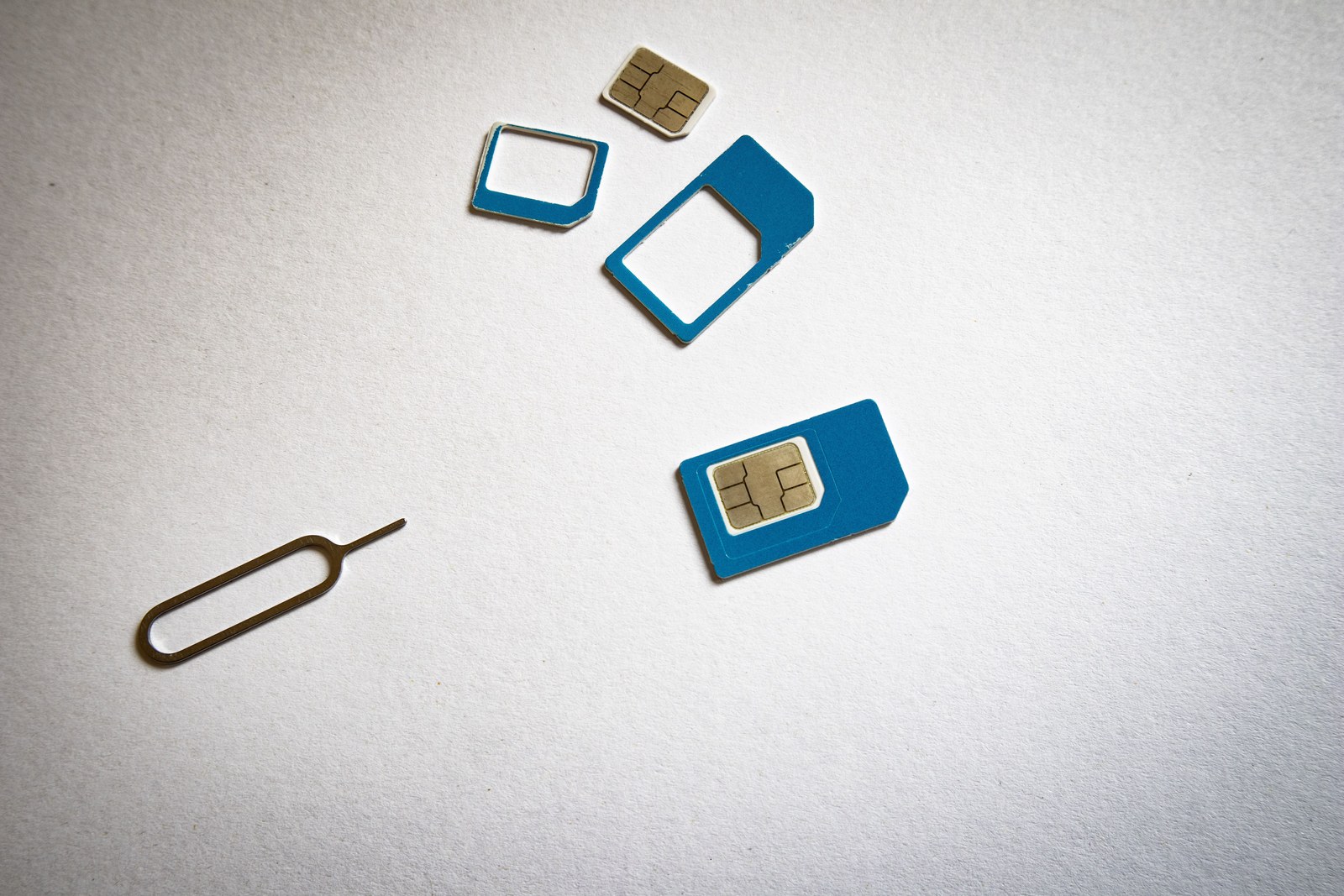
In 1991, G+D made the first SIM card and sold the first 300 to Radiolinja, the Finnish operator that launched the world’s first commercial GSM network that year. The card was the size of a credit card, 85.6 by 53.98 millimetres, with a plug-in piece that broke out to fit the slot.
The name already existed by then: Subscriber Identity Module, three words for a card that carried a subscriber’s identity in a module. Everything since has been a story of the same module getting smaller.
The table below tracks the shrinking. The chip and the contacts stayed the same through every step. Only the plastic frame changed, which is why a nano-SIM is the same module as the credit-card card of 1991, with most of the card cut away.
| Format | Arrived | Size |
|---|---|---|
| Full-size, 1FF | 1991 | 85.6 x 53.98 mm |
| Mini-SIM, 2FF | 1996 | 25 x 15 mm |
| Micro-SIM, 3FF | 2003 | 15 x 12 mm |
| Nano-SIM, 4FF | Early 2012 | 12.3 x 8.8 mm |
| eSIM | 2016 | 6 x 5 mm, soldered in |
| iSIM | 2021 onwards | Built into the modem or processor |
Each step down had a reason, and each reason was the phone getting smaller. The mini-SIM arrived in 1996 and became the standard card from the mid-1990s onward. ETSI and the other standards bodies agreed the micro-SIM form in late 2003, for devices too small for a mini-SIM, and it spread as phones shrank.
The nano-SIM followed a debate in early 2012 between designs from Apple, Nokia and RIM, and ETSI accepted Apple’s design. Providers first supplied it in June 2012. The nano-SIM measures 12.3 by 8.8 millimetres and is thinner than its predecessors, at 0.67 millimetres against 0.76.
Then the card itself started to disappear. The eSIM standard arrived in 2016, and the module became a chip soldered to the circuit board, with the carrier profile downloaded over the air. Wikipedia notes that an eSIM can hold several operator profiles at once, and a user can add or remove them without swapping a card.
The integrated SIM, or iSIM, goes one step further and builds the module into the modem chip or the main processor of the device. Qualcomm started offering processors with iSIMs in the Snapdragon 8 Gen 2, and Deutsche Telekom introduced the nuSIM, an integrated SIM for the Internet of Things, in 2021. G+D describes the integrated SIM as a tamper-resistant element inside a system-on-a-chip, which means the module is no longer a separate part at all, but a sealed corner of the processor.
Through all of it, the name held. The specification work moved partly from ETSI to 3GPP as networks grew from GSM to UMTS and beyond, and the USIM application arrived with stronger checks, including mutual authentication, where the SIM checks the network back.
The card also learned new tricks while it shrank. G+D notes that the SIM Toolkit standard arrived at the end of the 1990s and let developers build applications on the card, for mobile banking and information services. The module stopped being a key alone and became a small computer in its own right, with room for programs as well as credentials.
The card shrank three times, then vanished into the phone as an eSIM, then into the processor as an iSIM. Subscriber Identity Module still describes what it does, because the job never changed: carry a subscriber’s identity in a module the network can trust.
Read your own SIM’s story
You can read part of your own SIM’s story from the phone in your hand, and the check takes about a minute. It uses the one number the phone will show you: the ICCID, the serial number of the card. On an iPhone, open Settings, then General, then About, and look for the ICCID line.
On Android, open Settings, then About phone, and look for the SIM status entry, where the ICCID appears. The path varies by brand, and some Android phones hide the number under a SIM submenu.
Read the first digits and the card starts to talk. Every ICCID starts with 89, the code for telecommunication, and the digits after it name the country and the issuer. The rest of the number is the card’s own serial, unique to that piece of plastic. Compare it with the number printed on the card itself, if you still have the frame it arrived in, and the two match: the card you hold and the card the phone reports are the same module.
What you will not find is just as telling. The phone shows no IMSI and no Ki, because the phone keeps both out of the menus. The IMSI is the identity the network checks, and the Ki is the secret that proves it, and neither one is meant for the screen.
If a settings page showed the Ki, the whole design would fail, because the secret only works while it stays inside the chip. The ICCID is the card’s public face. The identity and the key stay behind it.
That split is the name in miniature. Subscriber is the account the ICCID traces back to. Identity is the IMSI the network checks and the phone never shows. Module is the card in your hand, with its serial number printed on the plastic and its secret locked in the chip. One minute in settings, and you can see all three words doing their jobs.
Questions people ask
What does SIM stand for?
SIM stands for Subscriber Identity Module. Subscriber is the person who holds the account, Identity is the IMSI number the network checks, and Module is the removable smart card that carries both.
Is a SIM card the same thing as a UICC?
In everyday speech, yes. Technically the UICC is the physical card and the SIM is the application that runs on it, with a USIM application beside it on modern cards. People call the whole unit a SIM card, and carriers do too.
Why is it called a module and not a card?
Because a module is a self-contained unit that slots into a larger machine and does one job. The SIM does exactly that: it carries an identity and a secret key in a unit you can move from phone to phone. The name describes the job, not the shape, which is why it still fits an eSIM with no card at all.
What was the first SIM card?
G+D made the first SIM card in 1991 and sold the first 300 to Radiolinja in Finland, which launched the world’s first commercial GSM network that year. The card was the size of a credit card, with a plug-in piece that broke out to fit the slot.
Does an eSIM still count as a SIM?
It still counts as a SIM. An eSIM holds the same identity and the same secret key, and the GSMA standard lets a phone download the carrier profile over the air instead of taking a card. Our SIM against eSIM against iSIM comparison lines up the three formats, and our guide to installing an eSIM on any phone walks through the setup.
Can I see my IMSI or my Ki in my phone settings?
The phone hides both. It shows the ICCID, the card’s serial number, and your phone number, but it keeps the IMSI and the Ki out of the menus. The IMSI is the identity the network checks, and the Ki is the secret that proves it, and both stay out of the menus by design.
Sources and check date
The three-words-three-jobs table and the read-your-own-SIM check are this post’s own synthesis of the sources below. No source lays the three words out this way, and none of them turns the ICCID into a check the reader can run on their own phone.
The expansion of SIM, the IMSI and Ki, the UICC and USIM, and the sizes and dates in the table come from Wikipedia. The 1968 patent, the 1989 standardisation, the first 300 cards, and the eSIM and iSIM milestones come from G+D. The description of eSIM as the only globally backed remote SIM specification comes from the GSMA, and the phone-number record and the UICC definition come from Sim-Finder.
- Wikipedia: SIM card
- G+D: The SIM turns 30
- GSMA: What is eSIM for consumer?
- Sim-Finder: What is a SIM card?
- Our guide to what a SIM card is
- Our guide to how a SIM card works
- Our SIM against eSIM against iSIM comparison
- Our guide to installing an eSIM on any phone
- Our nano against micro SIM comparison
- Our guide to the size your phone takes
- Our guide to what a SIM card does in your phone
Checked 24 November 2026